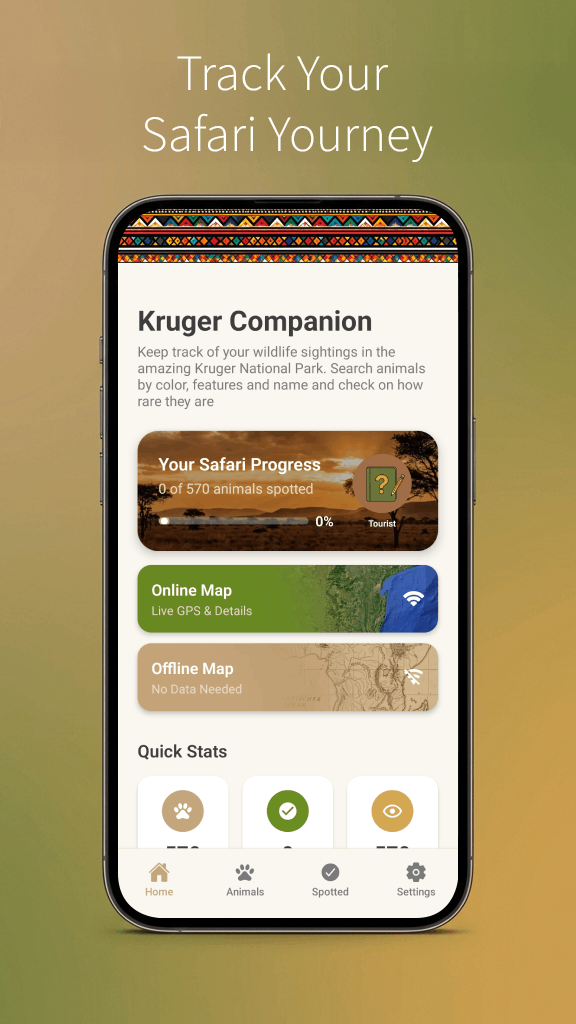
From Sightings to Stories: How to Use the Kruger Companion App on a Live Safari
You have downloaded Kruger Companion. The maps are offline. Now you are at Phabeni Gate with no cell signal and a full day ahead. What do you actually do with the app while driving-without becoming a screen-zombie and missing a leopard?
This is a practical field workflow for using Kruger Companion on a real self-drive safari, from gate open to campfire.
Before You Enter the Park (Wi-Fi Required)
Do this at your lodge or camp Wi-Fi the night before:
- Check gate times for your travel month-saved locally.
- Skim one curated route near your camp so you have a default plan.
- Charge phone + power bank; mount phone at eye level, not in your lap.
See App FAQ for full feature list.
At Gate Open: The Dawn Workflow
05:15-05:30 (summer example)
Coffee, keys, gate queue. Open app to map. Confirm your position once GPS locks inside the park.
First 60 minutes
- Follow a curated route or trace a short S-road loop you previewed last night
- Drive 20-30 km/h; app shows where you are if you miss a turn on gravel
- Log interesting species if you use wildlife logging-after you have stopped safely
Do not drive while scrolling. Passenger navigates, or pull to the verge on the correct side per sighting etiquette.
Mid-Morning: Route Decisions
When activity slows (see Weather & Animal Behaviour):
- If you are weighing a move between camps, use the Planner for drive times between rest camps-not from your exact position on an S-road
- Identify nearest picnic site (Picnic guide)
- Avoid starting a 40 km gravel loop at 11:00 if you must be back by 16:00
The planner is built for camp-to-camp routes. Judging whether you can still make it back to your camp before gate close is on you-from the map, the clock, and how far you have wandered.
At a Sighting: App Etiquette
Do:
- Identify species in the field guide after you have parked correctly
- Let a passenger browse mammal/bird profiles
- Note broad area for your own memory
Don't:
- Live-pin exact predator GPS to social feeds (Ethics guide)
- Hoot or block the road while distracted on your phone at a sighting
- Spend ten minutes filming your screen instead of the lion
Camp chat is only available inside rest camps-save sharing for back at camp, not from the road.
Identification Workflow
- See animal - binoculars first
- Stop safely - same side as sighting, lane clear
- Open field guide - filter by category or search
- Compare - size, tail, ears, habitat
570 species profiles work offline-this is the app's core superpower in dead zones.
Afternoon: Navigation Under Time Pressure
Set a mental alarm 90 minutes before camp gate close. On the app:
- Trace direct route to camp on tar if possible
- Check distance and avoid new loops
- Review gate times if crossing month boundaries on long trips
Passengers watch the map so the driver watches animals and road.
Camp Evening: Wi-Fi Tasks
When signal returns at reception:
- Sync any logging or community features if applicable
- Browse camp chat for general tips, not chase hysteria
- Plan tomorrow's route on the map-mark two S-roads and one escape tar road
- Read tomorrow's weather if available
Multi-Day Trip Rhythm
| Day phase | App focus |
|---|---|
| Pre-trip | Install, route bookmark |
| Dawn drive | GPS + one planned loop |
| Midday | Field guide ID, picnic nav |
| Afternoon | Time-to-camp, waterhole routes |
| Evening | Next day planning, gate times |
Simple Habits Alongside the App
A few low-tech habits pair well with the app:
- Written gate close time on a sticky note on the dash
- Passenger "spotter" with binoculars, not phone
The app enhances the drive-it does not replace looking out the window.
Common Mistakes
- Phone battery dead by noon - no charger
- Over-routing - following GPS while missing road sightings
- Crowd-chasing via chat - racing to jams instead of exploring quiet roads
- Ignoring etiquette - app community is not permission to block roads
Suggested First-Day Script
Camp: Lower Sabie (example)
- Gate open: drive S128 / H10 short loop via app route
- 09:30: field-guide ID anything unclear at sighting stops
- 11:00: return camp or Nkuhlu picnic
- 15:30: Sunset Dam area on map
- 16:30: head to camp gate (30-min buffer)
- Evening: bookmark tomorrow's S30-S128 combo
Adjust for your camp using First-Time Itinerary.
Related Guides
The best Kruger stories start with eyes on the bush and end with a phone that helped you navigate home before the gates closed. Use Kruger Companion as your co-pilot-not your destination.